


Opening your BeZoned office the first time
You can access BeZoned either directly in Microsoft Teams (desktop or web) or directly as a regular browser application.
Microsoft in general, recommend using the Microsoft Teams desktop application. If you are working a great deal with Microsoft Team already, then this should give you the best experience.
Open in Microsoft Teams (desktop or web)
You need to install the BeZoned app in your Microsoft Teams before you can use it inside Teams.
Install the BeZoned app click here
Open BeZoned, by clicking on the BeZoned logo in the left panel inside Teams
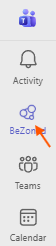 If you can't fint the BeZoned app in the panel, the click the 3-dot icon at the bottom of the panel and type BeZoned in the search box.
Note, pin the BeZoned app to the panel, to make it easy to find next time you want to open BeZoned.