A day in the BeZoned Virtual Office
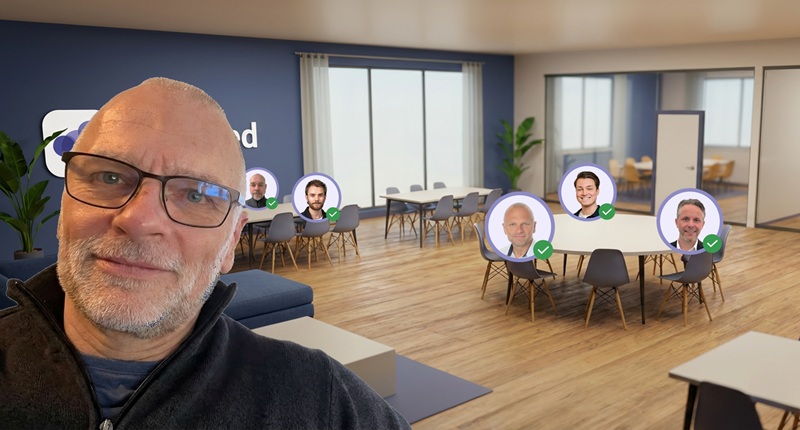
At BeZoned, we work remote. And then again, we don’t. Because throughout the day, we’re together in our BeZoned virtual office. It may sound a bit abstract, and I often get the question of what exactly a virtual office is and how it works. So let me walk you through a typical day in BeZoned.
Before I start, let me explain what a virtual office is. It’s basically an online workspace where teams collaborate, connect, and communicate as if they were all in the same physical office. It solves many of the well-known challenges of remote and hybrid work, for example the sense of presence, spontaneous conversations, creative problem solving, visibility, and human connection.
Getting to the Office
I’m an early riser, so I’m usually the first one in. In BeZoned, everyone has an Avatar representing them, and in early mornings, I can see that mine is the only one there. I move my Avatar to our “Team Table” signaling that I’m available.
I enjoy my first cup of coffee in peace and quiet while catching up on overnight e-mails. I’ve always loved that quiet start to the day. And I still do, even though the office is virtual.
I keep BeZoned open on my laptop next to my main screen. I like being able to glance over and see who is in the office, where they are sitting, and whether they are available. If I have a quick question, I just reach out. It feels natural and easy.
BeZoned doesn’t demand my full attention. I’m aware of what’s happening around me, and I can sense the office vibe. So having it open on my secondary screen is fine. My main screen is reserved for the applications I spend the majority of my time working in – Outlook, Excel, HubSpot, etc.
If someone reaches out for me while working in those applications, I can still hear them talk around the table and engage in relevant discussions.
Talking Across the Desk
After a while, my colleagues start arriving. They can see that I’m already at the Team Table. They join, turn on their microphones, and say good morning. We chat briefly about how things are going or what happened over the weekend. Just like you would in a physical office.
At 8:45, we have our daily check-in at the Team Table. It’s partly social, partly informal briefing on each of our agendas for the day. It takes five to ten minutes. Then we return to work.
We keep our microphones on throughout the day. If I need to ask something, I simply speak across the table. Everyone around the table can hear it and join in if relevant. If a conversation turns into a longer discussion, we move to a meeting room, so we don’t disturb those who are not involved.
Meeting Rooms
We move our Avatars into the meeting room and with one click we are in a Teams meeting. No booking in advance is necessary. When we’re done, we head back to the Team Table.
At 10 a.m., I have an online demo with a potential customer. I start a regular Teams meeting as the potential customer is not part of our domain. I move my Avatar to a meeting room anyway to signal that I am currently in a meeting and should not be disturbed. When I’m done, I move back to the Team Table.
Quiet Area
Later, I need to prepare for a couple of meetings. It’s hard to focus deeply while conversations are flowing across the Team Table. So, I move to our “Quiet Table”. Here, microphones are disabled and my status automatically switches to Busy. It’s a clear signal to my colleagues that I need focus time and should not be disturbed.
Taking a break
After another stint at the Team Table, it’s time for lunch. I grab a quick bite and go for a walk. With no commute, I have to remind myself to move. I place my Avatar at the “Away From Keyboard” table, and my status indicator turns yellow. The team knows I’m away, but I’ll be back soon.
Sharing Whiteboards, Plans, and Documents
At 2 pm, we have an internal team meeting. It’s scheduled in Outlook, but we simply move our Avatars to the meeting room and join with one click. The detour around Outlook or Teams to open appointments and click meeting links is not necessary.
In the meeting room, we have digital whiteboards, planners, and tools ready to go. And we have direct access to shared documents and notes. Brainstorms and follow-ups feel just as efficient as in a physical office.
Social time
Later in the afternoon, my colleague Thomas – who is also a coffee addict – suggests we grab a quick cup. We each brew a cup and meet in the Lounge Area. This is where we go to relax for a few minutes and talk about something other than work. Somehow, though, we often end up discussing ideas anyway. Just like we would at the water cooler.
Back at the Team Table, we put in the final effort of the day. When I’m ready to log off, I notice I’m alone at the table. The others are in meetings or at the Do Not Disturb table. I write a short message in the office chat and update my status to “Gone for the day”. Now everyone can see I’ve signed off.
On Fridays, we have a tradition of ending the week together with a drink. We jump into a meeting room, turn on the video, and spend half an hour wrapping up the week. We talk about weekend plans and remind ourselves of what we have achieved during the week. It’s a simple ritual, but it’s a really nice way to end the week – and it matters.
When I leave after a long day, I genuinely feel like I’ve been with my colleagues. Not alone at home. Not disconnected. But together as a team. It feels surprisingly close to having commuted to a physical office and spent the day side by side.
Solving the challenge
I’m biased, but I love it. I really do.
And I have a hunch that BeZoned will improve collaboration and social connectivity for most companies and teams that work hybrid or remote, whether they are large or small.
What do you think, will this help your team?